


Invoice Maker - Invoice Fly
4.73.63K Reviews
App Specs
- Version
- 2.44.0
- Updated On
- License
- Free
- Downloads
- 1,000,000+
- Developer
- Labhouse Mobile
- Categories
- Business
- Platform
- Android, iOS
Screenshots
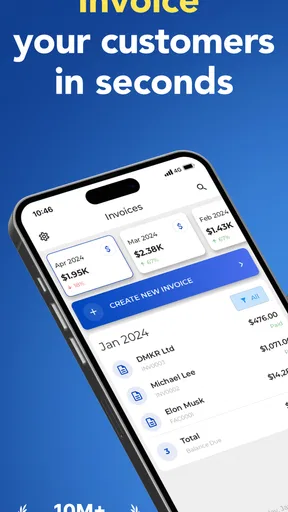
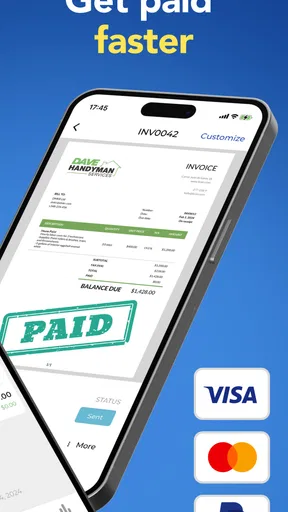
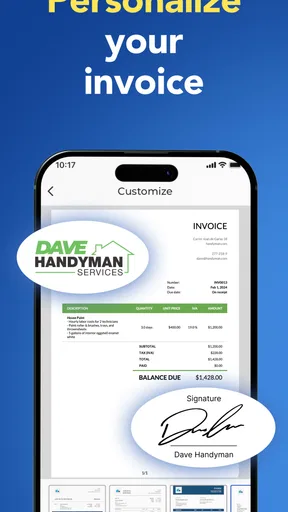
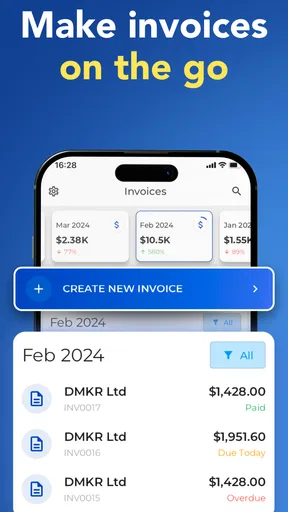
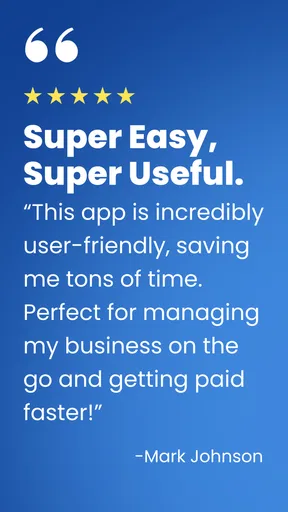
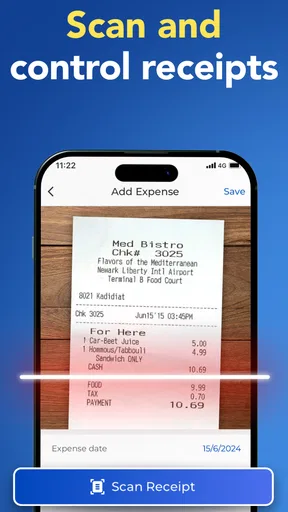
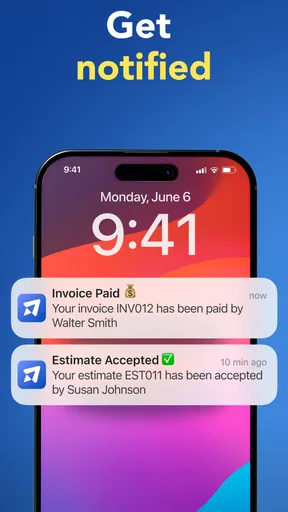
 Analysis by AppCompare
For a solo worker who finishes a job on-site and wants to turn the details into a bill before the day gets away from them, Invoice Maker - Invoice Fly is aimed at a practical problem: getting the paperwork out of the way while the work is still fresh. I see its strongest use as a lightweight invoicing workspace for freelancers and small operators, rather than a replacement for a full accounting system. That distinction matters: it can make routine documents easier to prepare, but choosing it still depends on how much financial administration your business needs.
Starting with the job, not the paperwork
A useful way to think about the app is to begin before opening it. Imagine you have completed a small project, agreed the scope with a client, and need to send a clear estimate or invoice without returning to a desk. The value is not simply that a document can be made on a phone; it is that the estimate, client details, notes, and eventual invoice can stay connected as the job moves from proposal to payment.
That workflow suits someone who invoices regularly but does not need complicated approval chains or deep bookkeeping. A freelance designer, repair professional, consultant, or other independent service provider can use a mobile invoice maker to keep client-facing paperwork consistent. By contrast, a business with several staff members, formal purchasing controls, or a requirement to reconcile every transaction in a larger accounting process should compare dedicated accounting tools before settling on this one.
From estimate to a document you can send
The sensible habit is to enter business information carefully at the outset, then check the details that change from one job to the next. The published app information identifies Labhouse Mobile as the developer, and the product is a free business app with in-app purchases. Its current version is 2.17.0, and it runs on Android 7.0 or later. I would still treat the first document as a setup test: check your business identity, the client’s details, the description of the work, and any terms or notes before sending anything externally.
The estimate-to-invoice conversion is the part of the workflow I would lean on most. When a client accepts a proposal, carrying the same job forward can reduce retyping and the risk of small differences between what was quoted and what is billed. My practical tip is to make the estimate description precise enough that it still makes sense on the final invoice. If the scope changes, update the wording and amounts before sending; a smooth conversion is useful, but it does not replace a human review.
Personalizing an invoice with a logo and business details can also help the document look recognizably yours. I would keep client-specific notes purposeful rather than treating every invoice as a blank canvas: payment expectations, a concise description, and relevant terms are more useful than decorative wording. Consistency makes repeat work easier for both sides, especially when a customer needs to compare a new bill with an earlier estimate.
Handing the document and follow-up to the client
Once a document is prepared, the next stage is the handoff: the client needs to receive it, understand what is due, and know what to do next. Invoice tracking can help you see activity around an invoice, while reminders may reduce the need to compose a separate follow-up message each time. I would use reminders as a prompt, not as a substitute for judgement. A client who has raised a question about the work may need a personal reply rather than another automated nudge.
Worth Reading Before You Choose

EA SPORTS FC Mobile 26 Is a Bigger Football Game, but It Takes Time

Flipboard Shows What News Apps Must Do Beyond the Feed

Switching to Android Auto Means Rethinking Your Driving Routine

Google Calendar Makes a Crowded Week Easier to Manage

Ludo King Makes the Most of the Minutes Between Plans

Baby Panda World Brings Quick Play to Modern Phones, but Its Game Library Feels Busy
Payment options are another part of that handoff. The original review describes connections with PayPal, Stripe, and bank transfers, but the most useful choice depends on what your client can actually use and what suits your own bookkeeping. Before relying on any route, check its availability and terms in the app and make sure the payment instructions on the invoice are clear. A client-facing payment option can shorten the path from receiving a bill to settling it, but it does not remove the need to verify that a payment has arrived.
For an everyday example, picture a self-employed photographer finishing a small assignment. They can prepare an estimate before the session, keep the agreed scope visible, and turn it into an invoice once the work is delivered. If the client has a question, the photographer can respond directly; if the invoice simply needs a polite reminder later, the app’s reminder function may save a little administrative time. That is a modest but realistic gain: fewer scattered documents and less reconstructing of what was agreed.
What happens after sending
The process does not end when the invoice leaves your phone. Tracking outstanding bills, recording expenses, and reviewing reports can help a small operator see which jobs have been paid and where money is being spent. Receipt scanning and expense logging are particularly useful when you build a habit around them: record a purchase soon after it happens, while you still remember which project or business purpose it belongs to. Leaving a pile of receipts until tax time makes any tracking tool less effective.
Reports can offer a quick overview of earnings, unpaid invoices, or expense patterns, but I would treat them as a working snapshot rather than a substitute for careful accounts. For tax filing, cash-flow planning, or decisions that depend on complete records, check that your entries are up to date and use the accounting process appropriate to your business. The app’s value is in making routine tracking more accessible, not in removing the responsibility to keep accurate records.
Where a mobile invoicing workflow can break
The biggest trade-off is scope. Invoice Maker focuses on documents and everyday financial administration; it may not be the right centre of operations for a company that needs detailed inventory, payroll, complex tax handling, team permissions, or tightly controlled approval steps. If those needs are central, a full accounting platform or a desktop-first business system is likely a better fit. Likewise, if you only send an invoice occasionally, a basic template may be enough and a dedicated app may add more process than you need.
There is also a difference between being free to download and having every feature available without cost. The app is free, with in-app purchases ranging from $5.99 to $299.99 per item, so I would check what is included before building a recurring workflow around a paid capability. I would not assume that a feature shown in the app is part of the free experience. That quick check is especially worthwhile if you plan to use the app for multiple clients or depend on a particular document or reporting option.
Invoice tools also rely on accurate input. A misspelled email address, vague work description, or outdated payment instruction can create delays that no reminder feature will fix. My best safeguard is a brief pre-send check: confirm the recipient, scope, amount, due terms, and chosen payment route. For repeat clients, keep the process consistent but still review each document; copying old details blindly is an easy way to carry forward a mistake.
People often wonder whether a phone-based invoice maker can handle a small business’s entire financial picture. I would use this one for issuing and tracking routine documents and recording day-to-day expenses, then keep a suitable accounting method for broader reconciliation and tax work if the business requires it. Another reasonable question is whether it suits international clients: the original review notes language support and currency conversion, which can make cross-border communication more convenient, but I would confirm the displayed currency and payment arrangement on each document rather than assuming conversion settles every banking or tax detail.
First Impressions and User Experience
Jumping right into Invoice Maker - Invoice Fly, the first thing that catches your eye is its sleek and intuitive design. The user interface is clean, which is crucial for an app that deals with numbers and details. It simplifies the whole process of creating and sending invoices, making it feel less like a chore and more like a breeze.
The app is designed to cater to everyone, from freelancers to small business owners. I mean, who doesn’t want to get paid faster and more efficiently, right? The setup process was a breeze. Within minutes, I had my business details entered and was ready to rock and roll.
Features That Stand Out
Let’s dive into what makes this app tick. First off, the customization options are pretty solid. You can personalize your invoices with your logo, business details, and even add notes or terms specific to each client. It’s these little touches that make your invoices look professional and tailored.
Another feature I found super handy is the ability to convert estimates into invoices. This saves a ton of time and keeps everything organized. Plus, there’s a real-time notification system that alerts you when an invoice is viewed or paid. It’s like having a personal assistant who keeps you in the loop without you having to lift a finger.
Oh, and did I mention the payment reminders? This feature is a game-changer. No more awkward emails or calls about overdue payments. The app does it for you, gently nudging your clients with a friendly reminder.
Performance and Functionality
In terms of performance, the app runs smoothly without any hiccups. I tested it on both Android and iOS, and it held up pretty well, ensuring a seamless user experience. The integration with various payment gateways is another big win. Whether your clients prefer PayPal, Stripe, or direct bank transfers, Invoice Maker - Invoice Fly has got you covered.
The app also offers a neat way to track expenses. It's like having a digital bookkeeper in your pocket. You can scan receipts and log expenses directly into the app, making tax season a lot less stressful.
The Little Extras
There are a few additional perks that make this app stand out. The ability to generate reports is super helpful for analyzing your business performance over time. You get insights into your earnings, outstanding invoices, and even expense trends. It’s like having an accountant whispering vital stats in your ear.
I also appreciated the multi-language support. It broadens the app's usability, especially for businesses working with international clients. The currency conversion feature is the cherry on top, allowing you to deal with clients worldwide without breaking a sweat.
With a 4.7 average from around 30,000 ratings and over 500,000 installs, Invoice Maker has clearly found an audience among people looking for a mobile way to handle business paperwork. Its Everyone age rating also makes the intended audience broad, though the useful question is less about age and more about workflow: do you want a quick invoice-and-expense tool, or a system that runs the whole business?
Compared with building each invoice in a word processor or spreadsheet, a dedicated app can save repeated formatting and keep estimates and bills closer together. A spreadsheet may still be preferable if you need unusual calculations or complete control over columns, while accounting software is the stronger option when invoicing must connect to detailed ledgers and formal reporting. I would choose Invoice Maker for speed and convenience, not for maximum control or as the only record of every business transaction.
One non-obvious way to get more dependable results is to treat the first few documents as templates for your own process, not just as files to send. Decide how you name work, describe revisions, and record expenses, then use the same conventions each time. That small discipline makes reports easier to interpret later and helps you notice when an expense has been logged without a clear business purpose. The app can organize what you enter; the quality of that organization still comes from your habits.
It is also worth separating the client handoff from your own recordkeeping. A polished invoice helps the customer understand the charge, but you should still confirm the payment status in your records and retain whatever documentation your business needs. Notifications can make follow-up feel less reactive, yet they should not be treated as proof that your books are complete. I find that distinction important for anyone who expects a mobile invoicing app to remove all financial admin.
Who will get the most from it
I would recommend it most readily to a person who sends recurring estimates and invoices, works directly with clients, and wants to handle routine administration away from a computer. The combination of document customization, estimate conversion, reminders, and expense capture addresses several small but frequent tasks in one place. Someone who only needs a bill once in a while may find a simple document template less demanding, while a growing company with staff and complex finance procedures should compare broader business platforms.
Before making it part of your routine, I would check the purchase options, create a sample document, and test the path from estimate through invoice to payment follow-up. That gives you a practical answer to the questions that matter: whether the available document style suits your clients, whether your preferred payment route works for your situation, and whether the paid features match the value you expect. The app is free to start, but a workflow should be chosen for fit rather than assumed to be cost-free in every detail.
Overall Verdict
So, is Invoice Maker - Invoice Fly worth the download? Absolutely. It streamlines the invoicing process, saves time, and helps keep your finances in check. It’s a tool that can easily become an integral part of your business operations, ensuring you focus more on what you love doing rather than getting bogged down by paperwork.
If you're still on the fence, I'd recommend giving it a try. The app offers a free trial, so you can dive into its features without any commitment. Trust me, after using it, you'll wonder how you ever managed without it.
Pros
- User-friendly interface for quick navigation.
- Customizable templates for professional invoices.
- Cloud sync ensures data is always backed up.
- Multi-currency support for global transactions.
- Time-tracking feature enhances billing accuracy.
Cons
- Limited integrations with other business tools.
- Free version includes intrusive ads.
- No offline mode for creating invoices.
- Customer support response can be delayed.
- Advanced features locked behind paywall.
FAQs for Invoice Maker - Invoice Fly
What features does Invoice Maker - Invoice Fly offer?
Invoice Maker - Invoice Fly provides a comprehensive set of features for small business owners and freelancers. Users can easily create professional invoices, track expenses, manage clients, and send reminders for overdue payments. The app also offers customizable templates, multi-currency support, and integration with payment gateways to streamline financial operations.
Is Invoice Maker - Invoice Fly user-friendly for beginners?
Yes, Invoice Maker - Invoice Fly is designed with an intuitive interface that makes it easy for beginners to navigate. The app offers step-by-step guidance for setting up your account, creating your first invoice, and managing your financial data. Its clean design ensures that even users with no prior experience can efficiently manage their invoicing needs.
Can I use Invoice Maker - Invoice Fly offline?
Invoice Maker - Invoice Fly primarily requires an internet connection for syncing data and sending invoices. However, you can still create invoices offline. Once you reconnect, the app will automatically sync your data, ensuring your information is always up to date. This feature is particularly useful for users who frequently work in areas with limited connectivity.
Does Invoice Maker - Invoice Fly offer customer support?
Yes, Invoice Maker - Invoice Fly provides robust customer support to assist users with any issues or questions they may have. Users can access support through in-app chat, email, or a detailed FAQ section. The app also offers tutorials and guides to help users make the most of its features, ensuring a smooth user experience.
Are there any subscription fees for using Invoice Maker - Invoice Fly?
Invoice Maker - Invoice Fly offers a free version with basic features, but to access its full range of advanced functionalities, a subscription is required. The app provides several subscription plans tailored to different business sizes and needs, allowing users to choose the best option for their budget and requirements. Monthly and annual plans are available.


